
Low-Voltage Field Reference • Technical term
EDID Explained for AV Systems: Resolution, Audio and Handshake Control
Extended Display Identification Data tells a source what formats a display or downstream AV path reports it can accept. In matrix, extender and capture workflows, the reported EDID may be copied, merged, emulated or forced, so the accepted format must be documented and tested through the complete path.
Direct answer
what is EDID in AV: the practical answer
Extended Display Identification Data tells a source what formats a display or downstream AV path reports it can accept. In matrix, extender and capture workflows, the reported EDID may be copied, merged, emulated or forced, so the accepted format must be documented and tested through the complete path.
For a working contractor, the value of this definition is its ability to translate field language into a verifiable design decision. Use the sequence meaning → project consequence → evidence → acceptance. The label alone never proves compatibility, compliance or performance.
What this changes in the design package
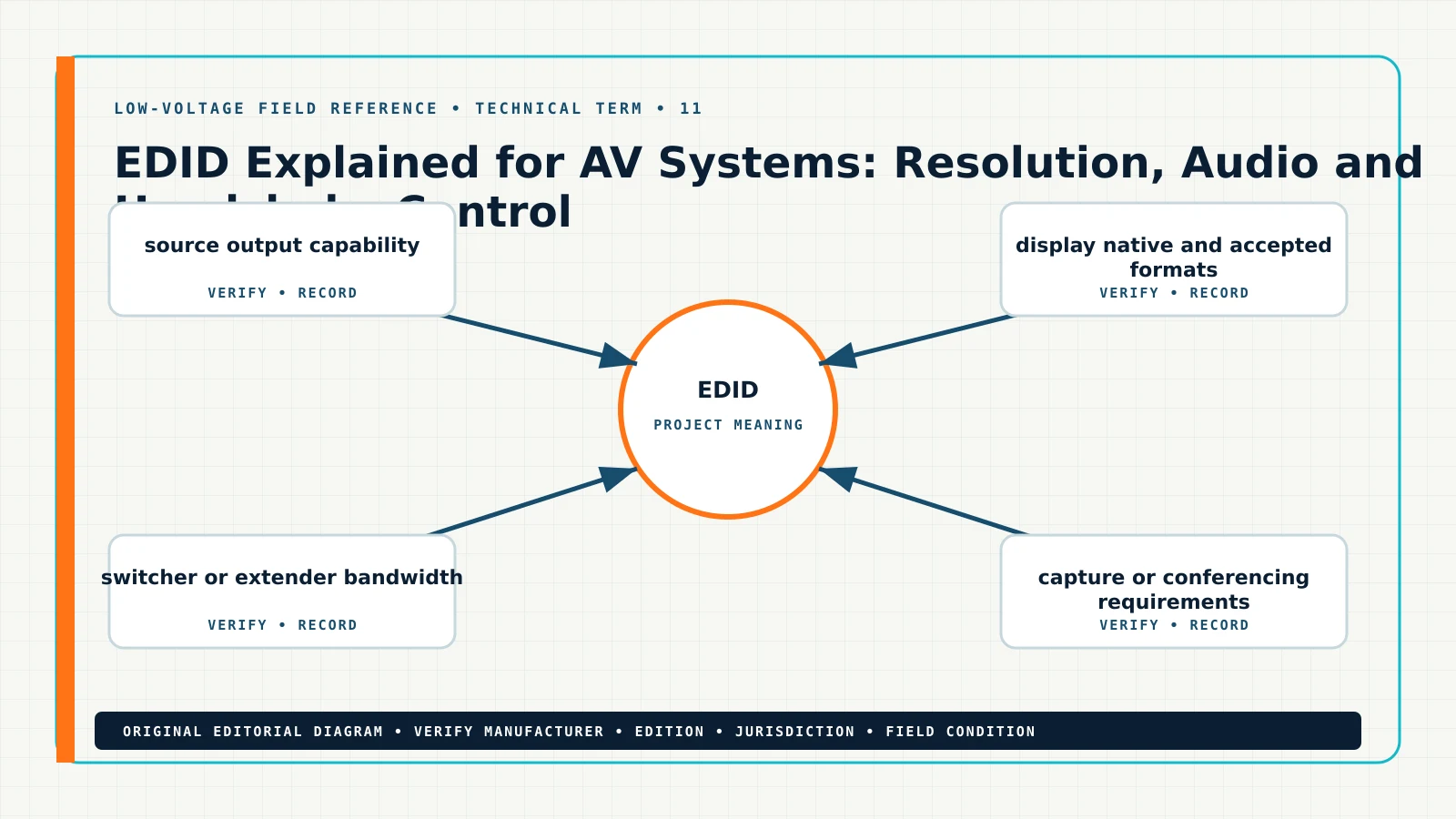
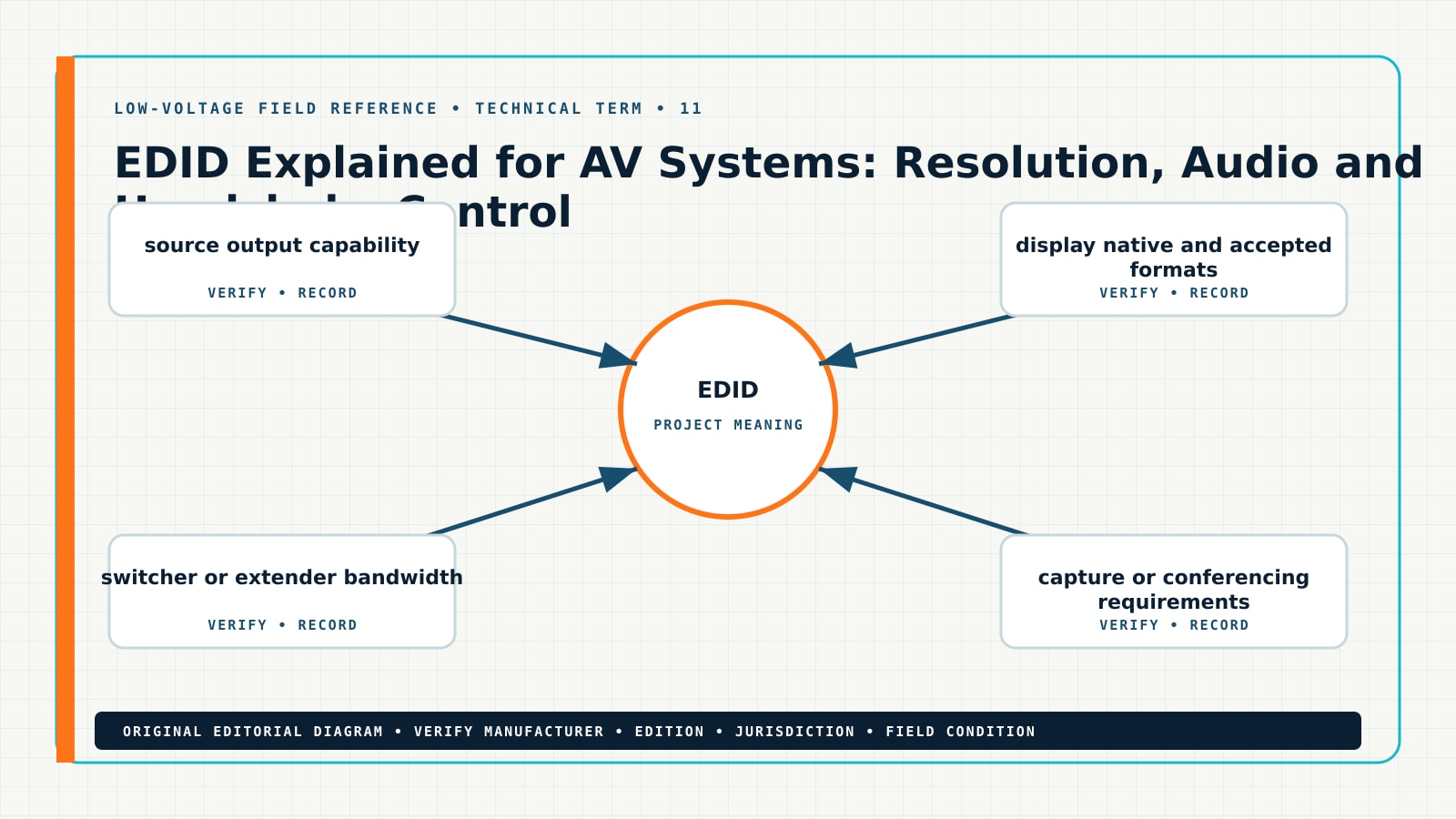
EDID Explained for AV Systems: Resolution, Audio and Handshake Control should change at least one controlled project record. On a floor plan, identify the physical location or route affected by source output capability and display native and accepted formats. On the riser or signal-flow drawing, show how the selected equipment, pathway, power and communications relationships support the intended outcome. In the schedule, preserve the exact data needed to buy, configure, install and test the system.
Plan
Show the device, route, zone or interface in context. Use stable IDs rather than relying on a symbol alone, and flag any assumption that can change quantity or performance.
Riser or schematic
Show origin, destination, intervening equipment, shared infrastructure and interface responsibility. A diagram should expose relationships the floor plan cannot show clearly.
Schedule
Record switcher or extender bandwidth, capture or conferencing requirements, audio extraction path and HDCP and hot-plug behavior where they can be reviewed and revised without redrawing the entire plan.
Proposal
State the verified design basis, named allowances, exclusions, owner/IT/electrical dependencies, testing method and the event that triggers a change order.
Field method
A repeatable definition workflow
Start by deciding what the term must communicate on this project. Then connect the definition to a selected device, a measurable setting, a drawing note and an acceptance result.
- 1. test the complete signal chain at the specified format.
- 2. read the EDID seen by the source.
- 3. power-cycle devices in realistic order.
- 4. save the accepted EDID and firmware versions.
After the final step, repeat the original operating scenario. A correction is not complete until the system passes the required function, the drawing and schedule match the installed condition, and the handoff record identifies what changed.
Decision and evidence table
| Question | Evidence to collect | Where to record it | Acceptance signal |
|---|---|---|---|
| What controls source output capability? | test the complete signal chain at the specified format; use exact model, reading, setting, photo or log evidence. | AV signal-flow note, keyed to the same device/cable/door/zone ID. | The reviewed record and field condition agree, with no unresolved assumption hidden as fact. |
| What controls display native and accepted formats? | read the EDID seen by the source; use exact model, reading, setting, photo or log evidence. | accepted format matrix, keyed to the same device/cable/door/zone ID. | The reviewed record and field condition agree, with no unresolved assumption hidden as fact. |
| What controls switcher or extender bandwidth? | power-cycle devices in realistic order; use exact model, reading, setting, photo or log evidence. | EDID file or setting record, keyed to the same device/cable/door/zone ID. | The reviewed record and field condition agree, with no unresolved assumption hidden as fact. |
| What controls capture or conferencing requirements? | save the accepted EDID and firmware versions; use exact model, reading, setting, photo or log evidence. | power-cycle acceptance test, keyed to the same device/cable/door/zone ID. | The reviewed record and field condition agree, with no unresolved assumption hidden as fact. |
Keep evidence close to the decision it supports. A screenshot without an equipment ID, a cable test without the cable identifier, or a code note without edition and jurisdiction is difficult to audit later.
Technical deep dive
Six controls that make EDID defensible
1. source output capability
challenge source output capability before the team commits HDMI handshake to the drawing. Identify who supplied the value, how current it is, which exact device, cable, interface, door, zone or route it controls, and what would invalidate it. If the answer comes from a product sheet, retain the model and revision. If it comes from a field observation, retain the location, timestamp, instrument or screen, and technician. If it comes from a requirement, retain jurisdiction, edition and reviewer.
Use this checkpoint to test the complete signal chain at the specified format. Compare the evidence with the intended audio/video outcome and the accepted project baseline. A discrepancy should become a named issue with an owner and due date; it should not be buried in a markup. Watch specifically for setting the highest resolution without checking every hop, because that failure can create a plausible-looking plan while breaking the installation, test or commercial handoff.
Close the checkpoint in the AV signal-flow note. Tie it to EDID and HDMI handshake with the same stable identifier used on the plan and schedule. The reviewer should be able to see the source, selected value, status, exception and acceptance result without reconstructing the designer’s assumptions from email.
2. display native and accepted formats
preserve display native and accepted formats before the team commits display resolution to the drawing. Identify who supplied the value, how current it is, which exact device, cable, interface, door, zone or route it controls, and what would invalidate it. If the answer comes from a product sheet, retain the model and revision. If it comes from a field observation, retain the location, timestamp, instrument or screen, and technician. If it comes from a requirement, retain jurisdiction, edition and reviewer.
Use this checkpoint to read the EDID seen by the source. Compare the evidence with the intended audio/video outcome and the accepted project baseline. A discrepancy should become a named issue with an owner and due date; it should not be buried in a markup. Watch specifically for confusing EDID with HDCP, because that failure can create a plausible-looking plan while breaking the installation, test or commercial handoff.
Close the checkpoint in the accepted format matrix. Tie it to EDID and display resolution with the same stable identifier used on the plan and schedule. The reviewer should be able to see the source, selected value, status, exception and acceptance result without reconstructing the designer’s assumptions from email.
3. switcher or extender bandwidth
establish switcher or extender bandwidth before the team commits audio format to the drawing. Identify who supplied the value, how current it is, which exact device, cable, interface, door, zone or route it controls, and what would invalidate it. If the answer comes from a product sheet, retain the model and revision. If it comes from a field observation, retain the location, timestamp, instrument or screen, and technician. If it comes from a requirement, retain jurisdiction, edition and reviewer.
Use this checkpoint to power-cycle devices in realistic order. Compare the evidence with the intended audio/video outcome and the accepted project baseline. A discrepancy should become a named issue with an owner and due date; it should not be buried in a markup. Watch specifically for letting a temporary service monitor change system behavior, because that failure can create a plausible-looking plan while breaking the installation, test or commercial handoff.
Close the checkpoint in the EDID file or setting record. Tie it to EDID and audio format with the same stable identifier used on the plan and schedule. The reviewer should be able to see the source, selected value, status, exception and acceptance result without reconstructing the designer’s assumptions from email.
4. capture or conferencing requirements
measure capture or conferencing requirements before the team commits EDID emulator to the drawing. Identify who supplied the value, how current it is, which exact device, cable, interface, door, zone or route it controls, and what would invalidate it. If the answer comes from a product sheet, retain the model and revision. If it comes from a field observation, retain the location, timestamp, instrument or screen, and technician. If it comes from a requirement, retain jurisdiction, edition and reviewer.
Use this checkpoint to save the accepted EDID and firmware versions. Compare the evidence with the intended audio/video outcome and the accepted project baseline. A discrepancy should become a named issue with an owner and due date; it should not be buried in a markup. Watch specifically for failing to retest after firmware updates, because that failure can create a plausible-looking plan while breaking the installation, test or commercial handoff.
Close the checkpoint in the power-cycle acceptance test. Tie it to EDID and EDID emulator with the same stable identifier used on the plan and schedule. The reviewer should be able to see the source, selected value, status, exception and acceptance result without reconstructing the designer’s assumptions from email.
5. audio extraction path
trace audio extraction path before the team commits AV matrix switcher to the drawing. Identify who supplied the value, how current it is, which exact device, cable, interface, door, zone or route it controls, and what would invalidate it. If the answer comes from a product sheet, retain the model and revision. If it comes from a field observation, retain the location, timestamp, instrument or screen, and technician. If it comes from a requirement, retain jurisdiction, edition and reviewer.
Use this checkpoint to test the complete signal chain at the specified format. Compare the evidence with the intended audio/video outcome and the accepted project baseline. A discrepancy should become a named issue with an owner and due date; it should not be buried in a markup. Watch specifically for setting the highest resolution without checking every hop, because that failure can create a plausible-looking plan while breaking the installation, test or commercial handoff.
Close the checkpoint in the AV signal-flow note. Tie it to EDID and AV matrix switcher with the same stable identifier used on the plan and schedule. The reviewer should be able to see the source, selected value, status, exception and acceptance result without reconstructing the designer’s assumptions from email.
6. HDCP and hot-plug behavior
reconcile HDCP and hot-plug behavior before the team commits EDID to the drawing. Identify who supplied the value, how current it is, which exact device, cable, interface, door, zone or route it controls, and what would invalidate it. If the answer comes from a product sheet, retain the model and revision. If it comes from a field observation, retain the location, timestamp, instrument or screen, and technician. If it comes from a requirement, retain jurisdiction, edition and reviewer.
Use this checkpoint to read the EDID seen by the source. Compare the evidence with the intended audio/video outcome and the accepted project baseline. A discrepancy should become a named issue with an owner and due date; it should not be buried in a markup. Watch specifically for confusing EDID with HDCP, because that failure can create a plausible-looking plan while breaking the installation, test or commercial handoff.
Close the checkpoint in the accepted format matrix. Tie it to EDID and EDID with the same stable identifier used on the plan and schedule. The reviewer should be able to see the source, selected value, status, exception and acceptance result without reconstructing the designer’s assumptions from email.
Field-capture worksheet
Before leaving the site, collect enough evidence that another qualified person can reconstruct the decision. Start with the site, floor, room and stable asset ID. Record the date, technician and current drawing revision. Photograph the overall context before taking close-ups, and place a readable label or reference in the image when practical.
- Identity
- Exact manufacturer, model, firmware or listing, terminal names, cable ID, panel/port/zone/door address, and the related plan symbol.
- Observed state
- What the user reported, what the technician reproduced, timestamps, LEDs or messages, logs, settings and whether the condition is continuous or intermittent.
- Measured state
- Applicable voltage, current, resistance, optical level, cable result, protocol status, signal format or environmental condition, including the instrument and test boundary.
- Change control
- The one change made, authorization, before/after evidence, temporary workaround, regression checks and any effect on other devices or shared infrastructure.
For this topic, call out source output capability, switcher or extender bandwidth and audio extraction path. Use the vocabulary EDID, HDMI handshake, display resolution consistently so the field note, drawing, schedule and proposal can be found together.
Worked field example
From an uncertain condition to a controlled record
A service technician receives a report involving EDID. The available plan shows a symbol, but it does not identify source output capability, display native and accepted formats or switcher or extender bandwidth. Instead of pricing or repairing from the incomplete symbol, the team opens a single issue record and assigns the affected equipment, cable or location a stable ID.
The technician collects the current settings, model information, photos and measured state. The designer compares that evidence with the selected equipment documentation and the current authoritative sources listed below. The estimator separates verified scope from allowances. The project manager records who owns any external dependency, such as an electrical circuit, network policy, door hardware condition, AHJ decision or owner-furnished device.
The corrected package includes the AV signal-flow note, accepted format matrix and EDID file or setting record. The team then repeats the operating test under the same conditions that produced the original question. That closed loop turns HDMI handshake and display resolution from search terms into traceable project decisions instead of isolated notes.
Common failure modes—and why they happen
Failure 01
setting the highest resolution without checking every hop
This shortcut removes context from the decision. Correct it by returning to the project-specific input, documenting the selected basis, and repeating the affected acceptance test.
Failure 02
confusing EDID with HDCP
This shortcut removes context from the decision. Correct it by returning to the project-specific input, documenting the selected basis, and repeating the affected acceptance test.
Failure 03
letting a temporary service monitor change system behavior
This shortcut removes context from the decision. Correct it by returning to the project-specific input, documenting the selected basis, and repeating the affected acceptance test.
Failure 04
failing to retest after firmware updates
This shortcut removes context from the decision. Correct it by returning to the project-specific input, documenting the selected basis, and repeating the affected acceptance test.
When a failure involves regulated life safety, egress, listing, energized work, public-safety radio, or code interpretation, stop at the boundary of your authorization. Escalate to the responsible qualified party and preserve the condition and evidence.
Minimum contractor deliverables
A useful answer survives the handoff from design to estimating, proposal, installation and closeout. At minimum, create the following:
- AV signal-flow note.
- accepted format matrix.
- EDID file or setting record.
- power-cycle acceptance test.
Each deliverable should show the project, revision, author, review status and the identity of the system element it controls. If a value is not verified, label it as an assumption, allowance, pending submittal or owner/AHJ decision. Do not let a blank field become an accidental commitment.
How to carry the answer into scope and proposal language
Describe the outcome first: what the customer will receive, where it applies and how it will be tested. Then name the basis used for EDID, including the controlling drawing revision and selected equipment data. Include the labor and documentation needed to produce AV signal-flow note and accepted format matrix.
Separate dependencies explicitly. Examples include usable owner drawings, accessible ceilings, working branch power, network addressing and policy, compatible owner equipment, door hardware readiness, permits, shutdown windows, AHJ review and access to occupied areas. If one of those facts is unknown, write an allowance or qualification and define how the price changes when the fact is confirmed.
Finish with acceptance: identify who witnesses the test, what evidence is retained and which result constitutes completion. This makes the page commercially useful without turning it into a product pitch.
Commissioning, handoff and future service
Commissioning should prove the designed function, not simply show that equipment turns on. Run the accepted scenario, an expected failure or trouble state, recovery, and any interface that crosses to network, electrical, fire alarm, door hardware, controls or owner systems. Save results against stable IDs and the approved revision.
At handoff, give the owner the AV signal-flow note, accepted format matrix, final configuration, approved substitutions, warranties and the contact path for unresolved external responsibilities. Remove default credentials and temporary access where applicable. Explain which changes can invalidate the result—for example a new firmware release, equipment replacement, changed speaker tap, moved camera, added cable, revised AHJ direction or modified switch policy.
Future service begins by comparing the current condition with this accepted baseline. If the record is missing, recreate it before making broad changes. That discipline reduces repeated troubleshooting, protects proposal scope, and lets the next technician distinguish a design issue from a later operational change.
Frequently asked questions
What should I verify first?
Start with source output capability and display native and accepted formats. Establish the exact product, project location and current system state before applying a diagram or changing configuration.
Can I use this page as a construction detail?
Use it as an editorial planning and verification aid. Convert it into a project detail only after reconciling the manufacturer instructions, adopted requirements, approved submittals and responsible professional or AHJ direction.
What belongs in the closeout package?
Include AV signal-flow note, accepted format matrix, EDID file or setting record, power-cycle acceptance test, plus test evidence, deviations, final settings and the identity of the person or authority that accepted the result.
What should I read next?
Continue with Speaker Hum or Buzz: Signal, Power and Grounding Troubleshooting, 70V Speaker Line Has No Audio: Troubleshooting from Amplifier to Last Tap, DORI Distance for Security Cameras: Detect, Observe, Recognize, Identify, Security Camera WDR Explained: When Wide Dynamic Range Helps and the Audio/Video design software resource.
Authoritative references and how to use them
These links are starting points for current primary-source information. Confirm the current edition, product revision, publication status, jurisdiction and applicability. Accessed for this release on 2026-08-08.
- HDMI Licensing Administrator — use the source to verify terminology, conformance, published requirements or manufacturer-specific behavior; do not substitute this summary for the controlling document.
- AVIXA audiovisual terminology — use the source to verify terminology, conformance, published requirements or manufacturer-specific behavior; do not substitute this summary for the controlling document.
- CISA Secure by Design — use the source to verify terminology, conformance, published requirements or manufacturer-specific behavior; do not substitute this summary for the controlling document.